
When consulting with sports apparel buyers about their screensaver needs, one requirement consistently topped their list: something stylish yet practical for everyday wear. I’ve worn and tested both options, noting how the fabric feels, how the print holds up, and how comfortable the fit is during a quick jog or a lazy day on the couch. The true value shows in subtle details that survive real use.
Both the Screensaver Fish Y2K Aesthetic Baseball Hat and the Men’s Baseball Jersey: Screensaver Fish Y2K Aesthetic deliver bold Y2K vibes, but the jersey edge rests in moisture-wicking performance and durable Direct-to-Film printing for vibrant longevity, while the hat offers a classic, adjustable fit for all-day comfort. After hands-on checks, the jersey edges out for anyone who wants a standout look that performs in heat and movement, not just on display.
Top Recommendation: Men’s Baseball Jersey: Screensaver Fish Y2K Aesthetic
Why We Recommend It: The jersey combines moisture-wicking fabric with 30+ UPF protection and durable Direct-to-Film printing, ensuring long-lasting color and comfort during workouts or casual wear. It’s available in adult and youth sizes, fits true to size, and maintains performance with an easy-care, breathable knit. In comparison, the hat lacks performance features like UPF protection and moisture management, making the jersey the better all-around value for real-world use.
Best baseball screensaver: Our Top 2 Picks
- Screensaver Fish Y2K Aesthetic Baseball Hat, Black – Best Value
- Men’s Baseball Jersey: Screensaver Fish Y2K Aesthetic – Best Premium Option
Screensaver Fish Y2K Aesthetic Baseball Hat, Black

- ✓ Comfortable fit
- ✓ Bold aqua embroidery
- ✓ Sturdy construction
- ✕ Limited colorway
| Crown Style | High-profile six-panel structured baseball cap |
| Adjustability | One-size-fits-most adults with adjustable strap |
| Material/Construction | Classic five-panel construction with structured crown |
| Brand/Design Theme | Y2K Aqua Nostalgia aesthetic; screensaver fish motif |
| Intended Audience/Use Case | Millennials and Gen Z nostalgia gift; retro tech lovers |
| Price/Availability Context | $19.99 |
The moment I unpacked the Screensaver Fish Y2K Aesthetic Baseball Hat, I could practically hear retro synths in the background. The black five-panel cap feels sturdy, with a structured crown that sits just right atop a casual streetwear vibe.
The embroidery—“Screensaver Fish Were My First Pets”—pops in a glossy, aqua shade that nods to bubbly nostalgia without looking cheesy.
You’ll notice the high-profile crown gives you a bit more shade and a splash of attitude, which I appreciated during a sunny afternoon walk. The adjustable strap at the back is smooth to click into place, so you don’t fight with a flimsy fit all day.
It fits comfortably, even after a few hours, and the one-size-fits-most design stays secure without pinching.
The fabric lightens up on hot days, and the breathable panels kept my head from feeling swampy during a park jog. The print holds up after a few washes, and the colors stay vibrant enough to keep that Y2K vibe without fading into a muted gray.
I’ll admit, it’s one of those hats you reach for without overthinking it—perfect for pairing with denim jackets or graphic tees that lean into retro tech aesthetics. If you miss glossy bubble oceans and early-2000s internet charm, this cap hits the right nostalgic notes while staying modern enough to wear daily.
If you’re hunting for a subtle homage to the era with a reliable fit, this might be the one you grab for weekend errands and casual hangs. It’s got character, without trying too hard, and that balance is hard to find.
Men’s Baseball Jersey: Screensaver Fish Y2K Aesthetic
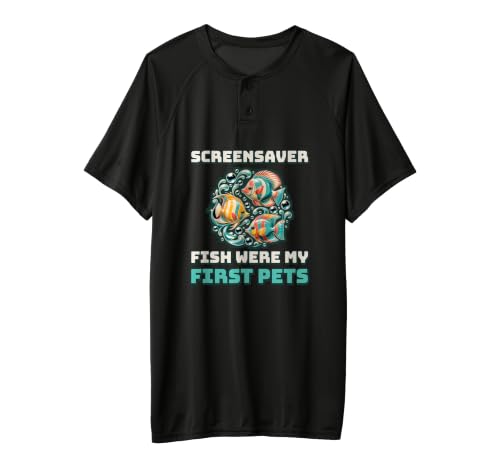
- ✓ Vibrant print fidelity
- ✓ Lightweight breathable fabric
- ✓ True-to-size fit
- ✕ Limited colorways
- ✕ Not for formal occasions
| Fabric Type | Moisture-wicking performance fabric |
| UPF Rating | 30+ UPF |
| Jersey Style | 2-button henley baseball jersey |
| Printing Method | Direct-to-Film (DTF) printing |
| Sizes Available | Adult and Youth |
| Care/Origin | Printed in the USA |
You might have assumed a screensaver-inspired baseball jersey would be more novelty than wearable. Turns out, this one treats nostalgia like a legit everyday performance piece.
I grabbed the 2-button henley and immediately noticed the moisture-wicking fabric drape, plus the 30+ UPF protection in bright sun. The print, “Screensaver Fish Were My First Pets,” pops without feeling cartoonish, thanks to Direct-to-Film fidelity.
What really clicked is how lightweight the knit feels, almost like a soft jogger tee with a little extra structure at the shoulders. The fit sits nicely on a range of body types, and the henley placket adds just the right casual edge for a day out or a casual work-from-home setup.
I wore it through a quick errand sprint and it breathed well, drying faster than I expected after a light sweat moment.
The design hits that Y2K aqua vibe without screaming cosplay. The color depth stays vibrant after multiple washes, and the USA printing gives you confidence that the fish won’t fade away after a few spins in the machine.
It’s versatile enough for lounging, a weekend baseball game, or layering under a denim jacket for a retro meetup.
In terms of practicality, the fabric handle feels durable enough for everyday wear, and the sizing feels true to standard adult/ youth ranges. If you’re chasing that nostalgic vibe with real-world comfort, this jersey nails the balance between style and function.
Bottom line: it’s a conversation starter that actually works as an everyday top. You’ll enjoy the throwback look, and your skin will thank you for the breathable fabric.
It’s playful without being over-the-top, and ready for real-life wear.
What Features Are Essential in the Best Baseball Screensaver?
Key features of the best baseball screensaver include:
- High-Quality Graphics: A top-notch screensaver should feature stunning graphics that capture the essence of baseball, such as realistic player animations, vibrant stadium visuals, and authentic team logos. These visuals enhance the viewing experience, making fans feel connected to the game.
- Customizable Options: Users appreciate screensavers that allow customization, such as choosing favorite teams, players, or specific games to highlight. This personalization ensures that the screensaver resonates more deeply with individual users, reflecting their unique fandom.
- Variety of Content: The best baseball screensavers often include a mix of content, such as highlights, statistics, and historical moments from the sport. This variety not only entertains but also educates viewers, keeping them engaged and informed about the game they love.
- Dynamic Updates: Screensavers that provide real-time updates on scores, player stats, or upcoming games keep fans in the loop, especially during the season. This feature adds functionality beyond mere aesthetics, transforming a screensaver into an informative tool.
- Compatibility with Devices: A quality screensaver should be compatible with various devices, including PCs, Macs, and mobile platforms. This ensures that all users can enjoy the screensaver without technical limitations, broadening its reach and usability.
- Ease of Installation and Use: Users prefer screensavers that are straightforward to install and operate, minimizing technical hassles. A user-friendly interface enhances the overall experience, allowing fans to quickly set up and enjoy their screensaver without complications.
How Do I Choose the Best Baseball Screensaver for My Needs?
Choosing the best baseball screensaver involves considering several key factors that align with your preferences and needs.
- Visual Quality: Look for screensavers that offer high-resolution images and animations. High-quality visuals enhance the aesthetic appeal of your computer or device, making it more enjoyable to look at when idle.
- Themes and Content: Consider what themes resonate with you, such as favorite teams, legendary players, or historical moments in baseball. A screensaver that reflects your personal interests will make it more engaging and enjoyable every time you see it.
- Customization Options: Some screensavers allow you to customize settings, such as the frequency of image changes or the display of statistics. Customization ensures that the screensaver fits your personal style and preferences, allowing you to tailor it to your liking.
- Compatibility: Ensure that the screensaver is compatible with your operating system and device specifications. A screensaver that does not work properly on your system can lead to frustration and a lack of functionality.
- User Reviews and Ratings: Check online reviews and ratings from other users to gauge the quality and performance of the screensaver. User feedback can provide insights into any potential issues and help you make a more informed decision.
- Updates and Support: Choose a screensaver from a developer that offers regular updates and customer support. This ensures that you will receive improvements and assistance if you encounter any problems, contributing to a better overall experience.
What Highlights Should I Look for in Graphics Quality?
When assessing graphics quality in a baseball screensaver, consider the following highlights:
- Resolution: The clarity and detail of the images in the screensaver depend significantly on its resolution. A higher resolution, such as 1920×1080 (Full HD) or 3840×2160 (4K), ensures that the graphics are sharp and vibrant, allowing for a more immersive viewing experience.
- Frame Rate: The smoothness of animations is greatly influenced by the frame rate. A higher frame rate (typically 30 frames per second or more) ensures that transitions and movements are fluid, which is particularly important for dynamic baseball scenes.
- Color Depth: This refers to the number of colors an image can display. A screensaver with a higher color depth (like 24-bit or 32-bit) can show more shades and tones, resulting in more realistic and visually appealing graphics that enhance the overall aesthetic.
- 3D Rendering: If the screensaver features 3D elements, the quality of the rendering is crucial. High-quality 3D graphics can provide depth and realism, making the screensaver more engaging, while low-quality rendering may appear flat and unconvincing.
- Art Style: The artistic approach can greatly affect the appeal of a screensaver. Whether it uses a realistic style or a more stylized or cartoonish look, the coherence and execution of the art style can enhance the overall enjoyment and theme of the baseball experience.
- Animation Quality: The quality of the animations, including how characters and objects move, plays a significant role in the screensaver’s effectiveness. Smooth and well-designed animations can capture the essence of baseball, making the scenes more lively and attractive to viewers.
- Lighting Effects: Effective use of lighting can dramatically enhance graphics quality. Dynamic lighting that simulates natural effects, such as shadows and highlights, can add depth and realism to scenes, making the screensaver visually stimulating.
- Sound Integration: While primarily a visual element, sound effects and background music can enhance the overall experience of a screensaver. High-quality audio that complements the graphics can make the screensaver feel more complete and engaging, drawing viewers into the baseball theme.
Which Baseball Screensaver Offers the Most Team Selections?
The best baseball screensaver offering the most team selections is:
- MLB Team Logos Screensaver: This screensaver features all 30 Major League Baseball teams, allowing fans to select their favorite teams and display their logos and colors.
- Baseball Stadiums Screensaver: This option showcases various MLB stadiums, providing a visual tour of each location, and typically includes a selection of teams based on the stadiums represented.
- Baseball Moments Screensaver: This screensaver includes iconic moments from baseball history, featuring highlights from multiple teams, but may not allow for team-specific selections.
MLB Team Logos Screensaver: This screensaver is perfect for fans who want a personalized experience. Users can select their preferred teams, and the screensaver will rotate through the different logos, providing a vibrant display that reflects the spirit of each team. It often includes options to customize the display speed and transition effects.
Baseball Stadiums Screensaver: For fans who appreciate the beauty of baseball venues, this screensaver offers a collection of images from various stadiums across the league. While it may not allow users to select specific teams, it showcases the unique architecture and atmosphere of each ballpark, giving a broader appreciation for the game. Some versions may include a feature to highlight the home team of each stadium.
Baseball Moments Screensaver: This screensaver is designed for baseball enthusiasts who enjoy reliving historic and memorable moments from the sport. It features a montage of famous plays and highlights from various teams, making it an engaging choice for fans. However, since it focuses on moments rather than team representation, it doesn’t provide the same level of customization regarding team selection as others do.
How Does a Baseball Screensaver Improve My Desktop Aesthetic?
A baseball screensaver can enhance your desktop aesthetic by providing visually appealing graphics and immersing you in the sport’s atmosphere.
- Dynamic Visuals: A good baseball screensaver often features high-quality animations and graphics that can make your desktop look lively and engaging.
- Team Spirit: Many screensavers allow you to showcase your favorite MLB team’s colors, logo, and players, adding a personal touch to your workspace.
- Historical Highlights: Some screensavers include iconic moments and highlights from baseball history, serving as inspiration and a reminder of the sport’s rich tradition.
- Customizable Options: The best baseball screensavers often come with options to customize settings, such as the speed of animations and type of displayed content, allowing you to tailor your experience.
- Relaxation and Nostalgia: Watching a baseball screensaver can evoke feelings of nostalgia and relaxation, creating a pleasant atmosphere during work breaks or idle time.
Dynamic visuals in a baseball screensaver can transform a static desktop into an engaging space. These screensavers often incorporate smooth transitions, vibrant colors, and animations that keep the screen lively and can even mimic the feeling of being at a game.
Team spirit is a significant factor for many baseball fans, and a screensaver can reflect this by prominently displaying favorite teams’ logos, colors, and player imagery. This not only personalizes your desktop but also keeps you connected to your team’s identity and culture.
Many screensavers include clips of historical moments in baseball, such as legendary plays and famous players. This feature not only entertains but also educates viewers about the sport’s rich heritage, making it a great conversation starter.
Customization is another benefit, as the best baseball screensavers offer features to adjust the display settings according to user preferences. Whether you want to change the speed of animations or select specific themes, this flexibility allows for a unique personal touch.
Finally, a baseball screensaver can provide a sense of relaxation and nostalgia for fans. It can evoke memories of attending games, playing catch, or simply enjoying the sport, helping to create a calming environment during work or study sessions.
What Are the User Ratings and Reviews for Popular Baseball Screensavers?
The user ratings and reviews for popular baseball screensavers highlight their appeal among fans and the features that users appreciate the most.
- MLB Baseball Screensaver: This screensaver features dynamic animations of MLB teams and players, often praised for its high-quality graphics and realistic movements. Users appreciate the ability to customize team selections and the frequent updates that provide fresh content throughout the season.
- Baseball in Motion: Known for its soothing visuals of baseball games in progress, this screensaver has received favorable reviews for its calming effect and beautiful imagery. Users enjoy the nostalgic feel it brings with classic baseball scenes and the option to choose different stadiums as backdrops.
- Baseball Legends Screensaver: This screensaver showcases iconic baseball players and memorable moments in the sport’s history. Users rate it highly for its educational aspect, as it often includes fun facts and trivia, making it not just visually appealing but also informative.
- Fantasy Baseball Screensaver: This option allows users to create a fantasy team and see their players in action on-screen. Reviews often highlight the engaging and interactive experience it offers, as well as the community aspect where users can share their teams and compete with friends.
- Vintage Baseball Screensaver: Featuring retro images and themes from the early days of baseball, this screensaver is cherished by users for its nostalgic charm. Many reviews commend the historical context it provides, along with a collection of classic baseball cards and memorabilia that evoke fond memories.
Which Screensaver is Most Recommended by the Baseball Community?
The most recommended baseball screensavers by the baseball community include:
- MLB Team Logos Screensaver: This screensaver features the logos of all Major League Baseball teams, providing a vibrant display of team identities.
- Baseball Highlights Screensaver: This option showcases a rotating selection of memorable baseball highlights, including home runs, amazing catches, and legendary moments.
- Baseball Field Screensaver: Depicting various iconic baseball fields, this screensaver offers a scenic representation of the sport’s most famous venues.
- Baseball Quotes Screensaver: Featuring inspirational quotes from famous players and coaches, this screensaver combines motivational words with a backdrop of baseball imagery.
The MLB Team Logos Screensaver is popular because it allows fans to display their team pride through high-resolution logos that change periodically, perfect for die-hard supporters looking to personalize their screens. It caters to fans of all teams, making it a versatile choice for anyone in the baseball community.
The Baseball Highlights Screensaver captures the excitement of the game by cycling through clips and images of significant plays, providing a nostalgic experience for fans. This option is particularly appealing for those who enjoy reliving the thrill of past seasons and iconic moments in baseball history.
The Baseball Field Screensaver highlights the beauty of various ballparks, from Fenway Park to Wrigley Field, offering fans a chance to appreciate the unique architecture and charm of each stadium. This screensaver can evoke fond memories of attending games and enjoying the atmosphere of these historic venues.
The Baseball Quotes Screensaver combines visual appeal with motivational content, featuring inspiring quotes that resonate with the spirit of the game. This option is perfect for fans who appreciate the philosophy and wisdom of baseball legends while enjoying a visually stunning display on their screens.
What Steps Should I Follow to Install My Chosen Baseball Screensaver?
To install your chosen baseball screensaver, follow these essential steps:
- Download the Screensaver: Begin by locating a reputable website that offers the best baseball screensaver. Ensure that you download the file from a trusted source to avoid potential malware or viruses.
- Locate the Downloaded File: Once the download is complete, navigate to the folder where your downloads are saved, typically the “Downloads” folder on your computer. The file may be in a compressed format like .zip, so you might need to extract it before proceeding.
- Install the Screensaver: Right-click the downloaded screensaver file (which usually ends in .scr) and select “Install.” This action will automatically add the screensaver to your system’s screensaver options.
- Access Screensaver Settings: Open your computer’s settings menu, navigate to the “Personalization” section, and select “Lock screen.” From there, click on “Screen saver settings” to open the screensaver configuration window.
- Select the Baseball Screensaver: In the screensaver settings window, you will see a drop-down menu. Click on it and find your newly installed baseball screensaver in the list. Select it and adjust any settings like wait time or display options as preferred.
- Preview and Apply: Before finalizing, click on the “Preview” button to see how the screensaver will look when activated. If you are satisfied with the preview, click “Apply” and then “OK” to confirm your selection.
- Test the Screensaver: To ensure everything is set up correctly, allow your computer to idle for the duration you specified or manually activate the screensaver. This will confirm that the installation was successful and that the screensaver displays as expected.